Scan Your Receipts Into a Maintenance History — Your Car's Too
Every shop has the drawer. Blade receipts, a belt from the hardware store, the invoice for the bandsaw tune-up, three years of oil changes for the van. It's all proof of how well you've looked after your things, and none of it is any use in a drawer. Typing it in one receipt at a time is the job nobody ever gets to.
So CraftedTracker can now read them for you. You take the photos, it fills in the entries, and you check each one before anything is saved.
Photograph the pile — or hand it the scanner's PDF
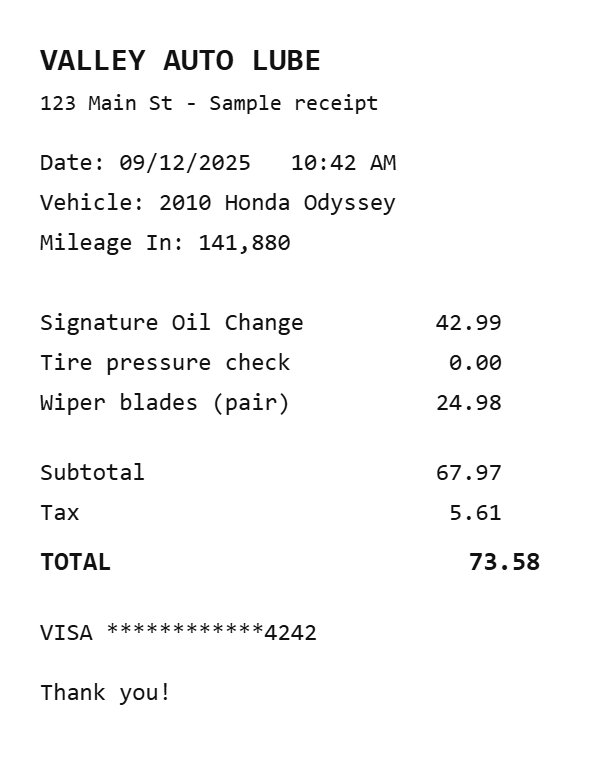
Open Scan receipts from the + Add menu and either take photos one after another or pick photos you already have. If your scanner puts a whole stack into one PDF, choose that: the app splits it into one receipt per page right there on your phone or computer, before anything is uploaded. My own test was a 15-page PDF of car receipts going back to 2010.
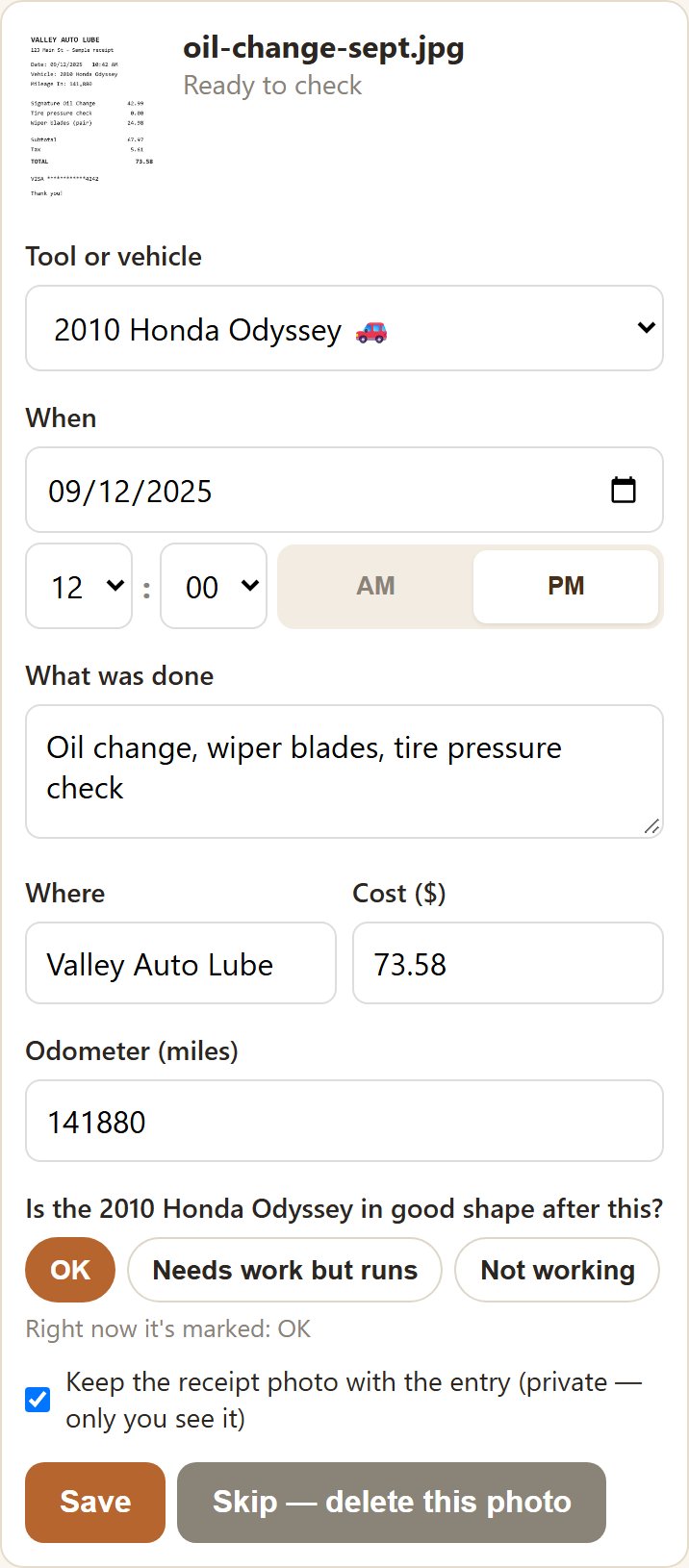
Each receipt gets its own card, and two are read at a time while you work through the ones already done. A card comes back with:
- which tool it's for — matched against your own tool list, never guessed from thin air;
- the date, the shop and the cost;
- a short note of what was done — "Replaced blade — 10-inch 40T", "Oil change, wiper blades";
- and for a vehicle, the mileage printed on the receipt.
You check it — and one question is always yours
Anything the reader wasn't sure of is highlighted with "check this." When a date is smudged or handwritten, a second, stronger reader takes another look before the card comes back. And when it still can't read something, it leaves the box empty rather than inventing a number. In testing that mattered more to me than speed: a blank you fill in is fine; a confident wrong date in your records is not.
One thing it never fills in is the condition after the work. The card asks you — "Is the table saw in good shape after this?" — with three buttons: OK, Needs work but runs, Not working. You tap one. Only you know whether the tune-up actually fixed the wobble.
A few more things the card handles:
- Blades, bits, belts, filters and other parts count as maintenance on the tool they go on, so "when did I last change this blade" has an answer. Sandpaper, glue and finish are shop supplies, and the card says so.
- One receipt for several tools? Pick them all; the cost splits evenly and you can adjust it.
- Already logged it? If a tool already has an entry for the same day and amount, it asks before saving a second one.
- A purchase receipt fills in the tool's price and purchase date — but never overwrites ones you already have unless you tick the box.
Keep the receipt, or don't
Each card has a "Keep the receipt photo" tick, on by default. Kept, the photo stays with the maintenance entry, in private storage only you can open: proof for an insurance claim or a warranty. Untick it and the photo is deleted as soon as the entry saves. You can remove a kept receipt later, too. Receipt photos count toward your storage like any other photo, which is why it's your choice each time.
Your car gets a maintenance history
This is the part I wanted most. If you have a car or truck set up as a place, its one tag already starts and ends trips and records the odometer. Now it also keeps the car's records: tap its name on the dashboard to open its maintenance history, receipts and documents, with the mileage beside every service. When you log something by hand, it even shows the last odometer reading it knows from your trips.
Oil changes, tire rotations, the transmission service, the timing belt — the things that matter when you sell a car, or hand it to someone and want to know it's being looked after. (Reminders for when each of those is due are the next thing I'm building.)
What a buyer sees — your choice, per tool
Every tool and vehicle now has a "Show maintenance history" tick. On, anyone who taps its tag sees what was done and when, the condition, and for a vehicle the mileage — the kind of record that helps a used tool or a car sell for what it's worth. Off, they don't. What you paid, where you had it done, and the receipts themselves are never shown to anyone who taps a tag, whichever way the tick is set. A car's tag starts with the tick off.
Already have a spreadsheet?
If you've kept a log in Excel or Google Sheets, + Add → Import maintenance history brings it in without any AI at all: one row per job — the tool's name or tag code, the date, what was done, and optionally the condition, cost, shop and odometer. You see a check screen first, and a row whose tool it can't find is listed for you, never guessed.
What gets sent, plainly
Receipt scanning sends the receipt photo, and only one you add, to Anthropic's Claude to be read, along with your list of tools (name, brand, model and serial number) so it can tell which one the receipt is for. It's told to ignore card numbers, and anything that still looks like one is stripped before the card is filled in. Nothing is used to train an AI. The privacy policy has every detail, including how long Anthropic keeps a request (30 days, per its own published policy). Receipt scanning is included during the beta, with a monthly limit per account.
If you've got a drawer like mine, start with the oldest receipts in it. Those are the ones you'd never have typed.
CraftedTracker is in open beta — the founder rate ($4/mo or $40/yr, locked for as long as you stay) goes to the first 20 paid subscribers.
Create my account